

AI that works inside your project workflow — not alongside it.
AI project management tools
that connect meetings to execution
Your meetings generate decisions. J.O.T AI captures, prioritizes, and assigns those decisions — so your team always knows what to act on next, right where the project lives. No copy-paste. No reconstruction. No lost context.
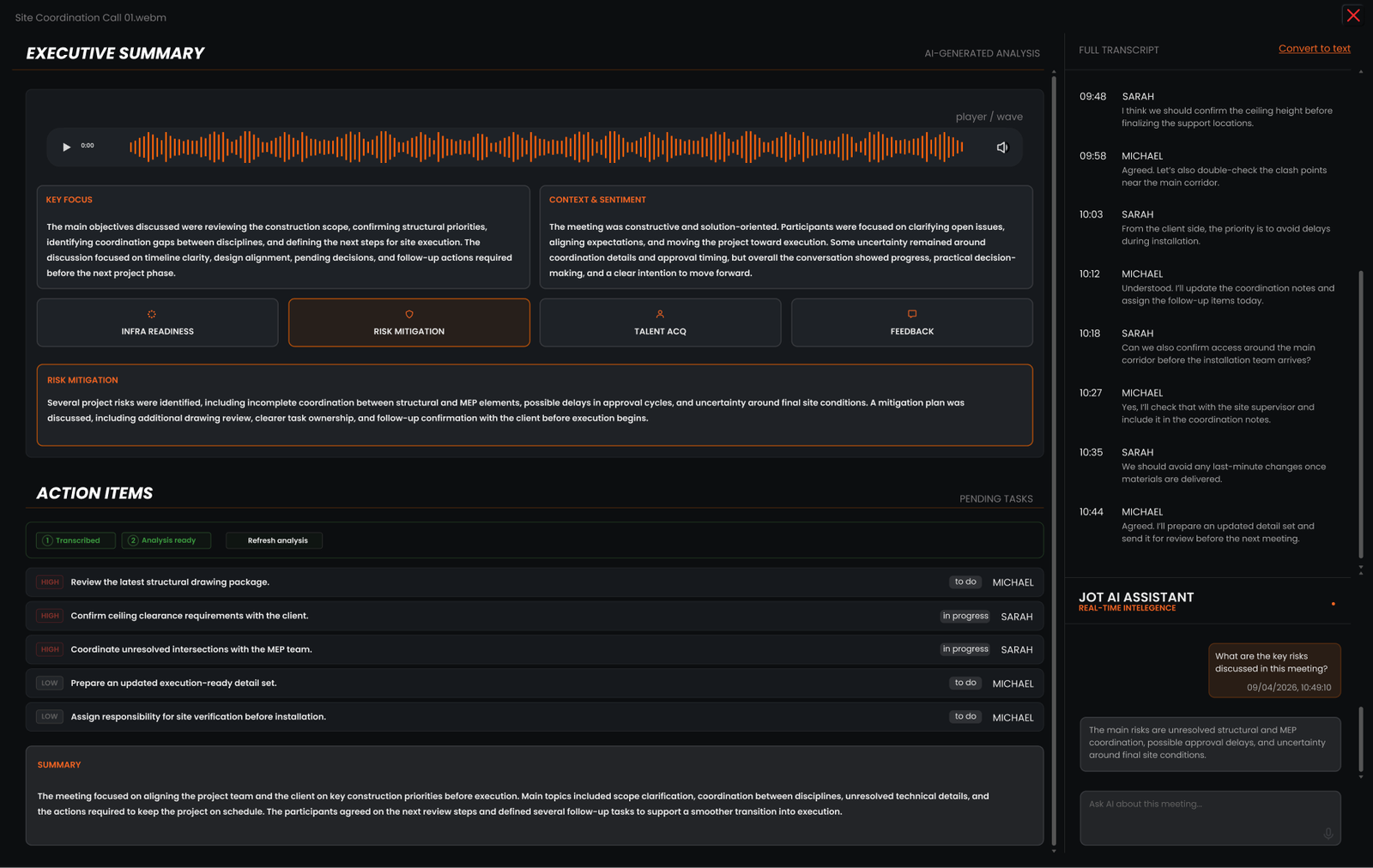
What are AI project management tools?
AI project management tools use artificial intelligence to handle the operational layer of running a project — so the team can focus on the work that requires human judgment. However, not all AI tools for project management are built the same.
Decisions become structured action
Every action item from every meeting is captured, prioritized, and assigned by AI. Your team reviews and acts — right inside the project.
Risks surface early
AI identifies blockers, gaps, and risks at the meeting stage — before they cascade into a delayed phase.
Meeting output is always traceable
Every summary, risk, decision, and action item from every meeting lives in the project — searchable and visible to the whole team, immediately.
J.O.T APP is AI project management software built specifically for engineering, architecture, and technical operations teams. For this reason, AI in J.O.T APP is not an add-on or a chatbot — it is embedded in the core workflow, from the first meeting recording to the final daily report.
AI project management tools change how teams operate
Here is what shifts when J.O.T AI becomes part of your project workflow.
Without J.O.T AI
- Meeting ends — decisions live in someone's notebook or inbox;
- Action items are manually typed into the task board hours later;
- What was decided on the call and what ends up in the task board are two different things;
- Team members ask "what was decided in that call?" — again;
- Risks surface when it is too late to course-correct cheaply
With J.O.T AI
- Meeting ends — action items are structured, prioritized, ready to review;
- AI identifies and presents tasks for team confirmation in minutes;
- Team has clarity on what to act on — AI-prioritized, owner-assigned, ready to review;
- Meeting summaries, action items, and risks are immediately visible to the whole team;
- Risk Mitigation analysis runs on every recording, automatically
How J.O.T AI handles the
full meeting-to-execution chain
Understand the meeting
- Full transcript with speaker attribution
- Key Focus — what the meeting was about
- Context & Sentiment — tone and dynamics

Extract execution signals
- Action items with priority levels
- Risk Mitigation — risks and plans
- Infrastructure Readiness — delivery blockers
Push into workflow
- Team reviews action items with AI-set priorities and owners
- Updates statuses within the meeting summary
- Sprint integration (coming soon)
Five steps from recording to delivery
Here is what shifts when J.O.T AI becomes part of your project workflow.
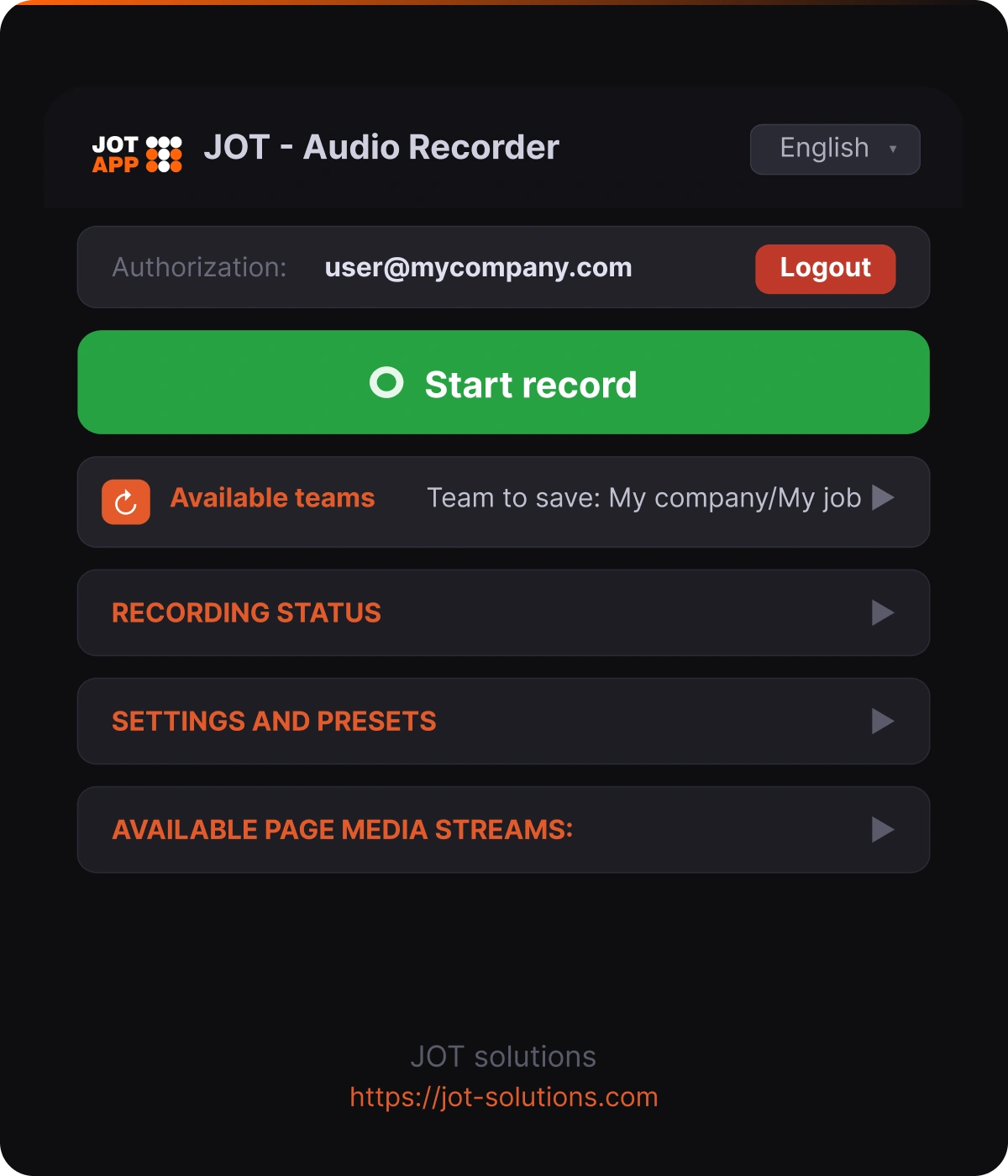
Meeting recording
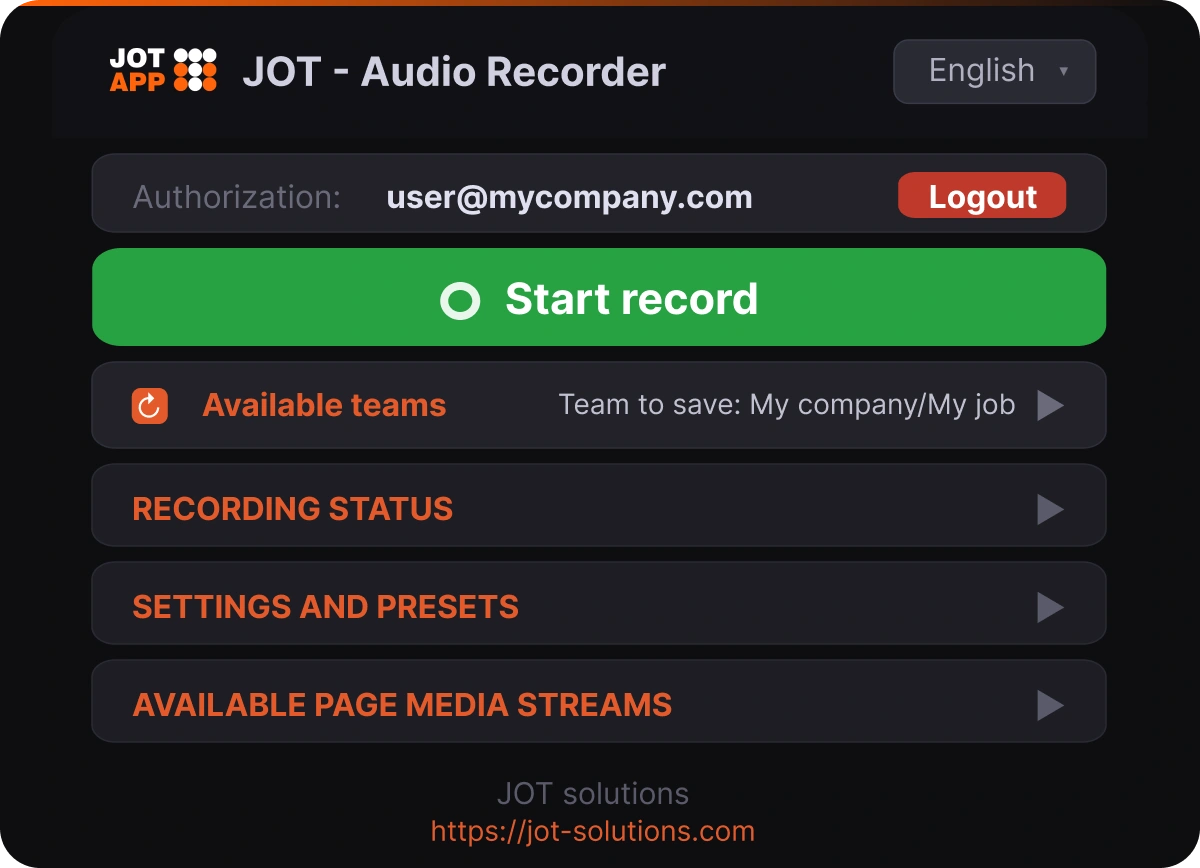
Record your meeting with one click
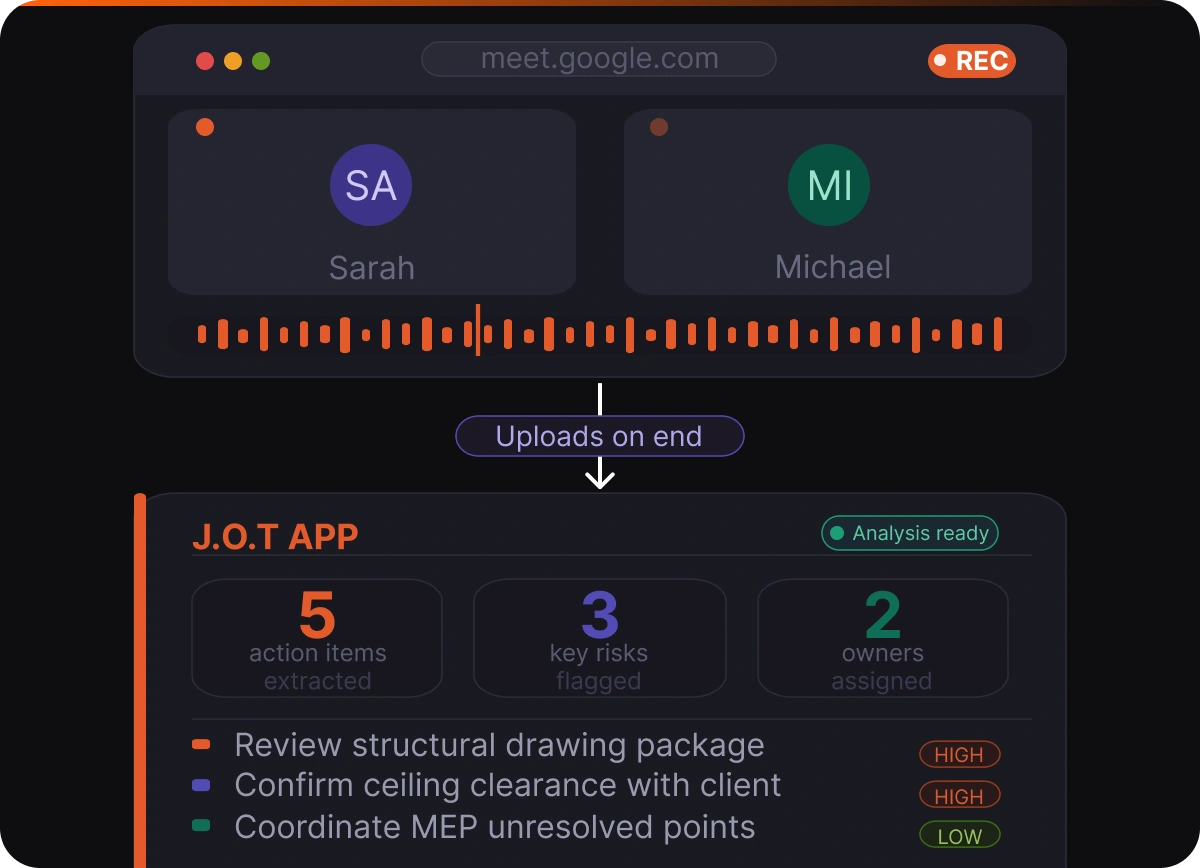
J.O.T APP's browser plugin captures your Zoom, Google Meet, or Microsoft Teams meeting audio directly from the browser. There is no bot joining the call and no separate software to configure. When the meeting ends, you choose which J.O.T APP project to upload the recording to — and upload it with one click. Alternatively, you can save the file to your device.
This recording becomes the source of truth for every AI output that follows. In other words, everything starts here.
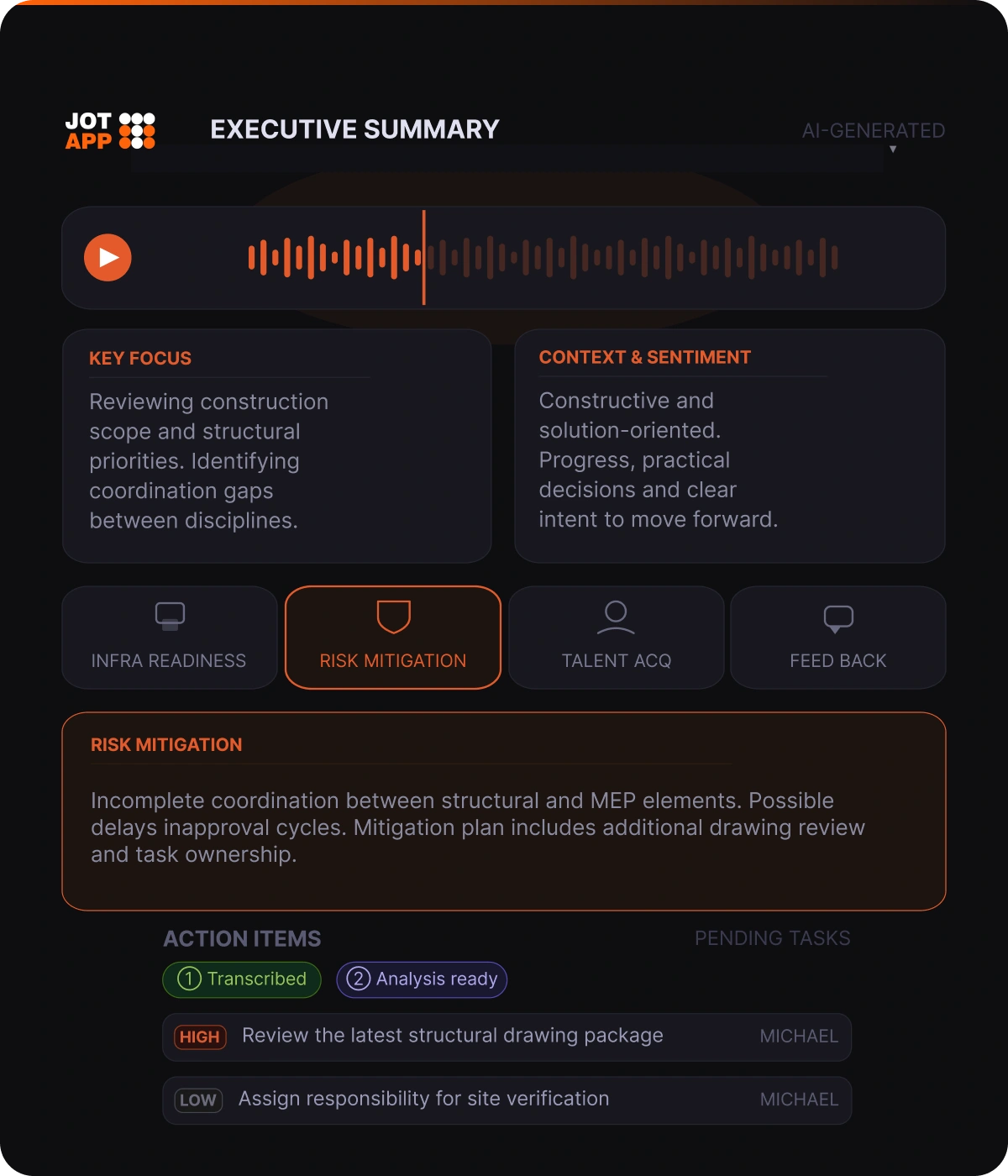
AI meeting summary
Get a structured meeting summary — instantly
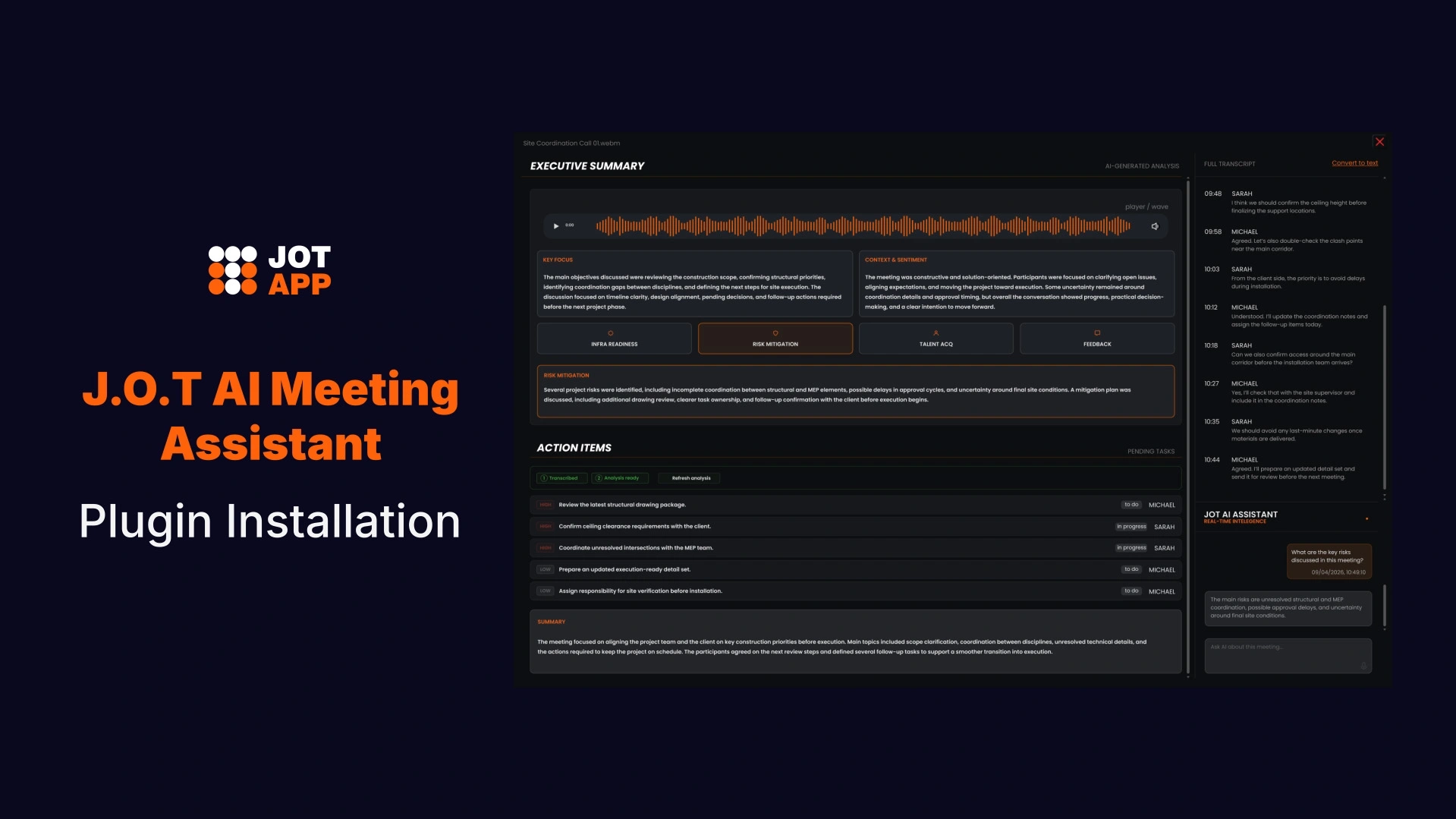
After the recording uploads, J.O.T AI produces a full Executive Summary. Rather than condensing the transcript, it organizes the meeting around what the project team needs to know: Key Focus, Context and Sentiment, and four intelligence dimensions analyzed automatically.
For project managers who run team check-ins, design reviews, or client calls, this replaces manual meeting minutes entirely. Additionally, the summary is ready before the next person has closed their laptop.
Action items
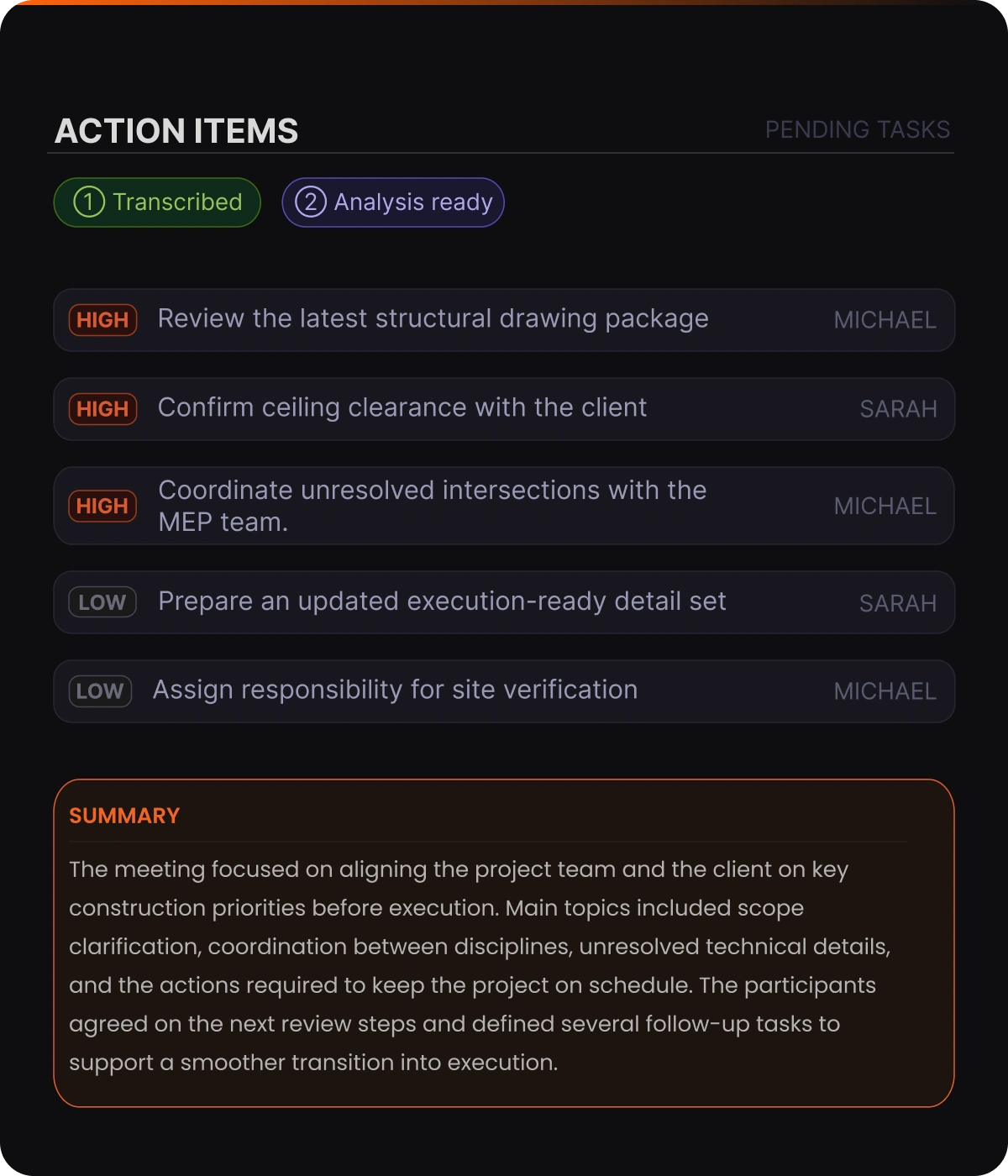
Review AI-identified action items — your team confirms what moves forward
J.O.T AI reads the meeting and identifies action items with priority levels — high, medium, or low — based on urgency signals and discussion context. The team then reviews the structured list and confirms which items to act on — priorities and owners are already set by AI.
AI does the identification. People make the call. As a result, the team always knows exactly what the meeting produced — not what someone tried to recall two days later.
Ask AI
Ask the AI anything about the meeting
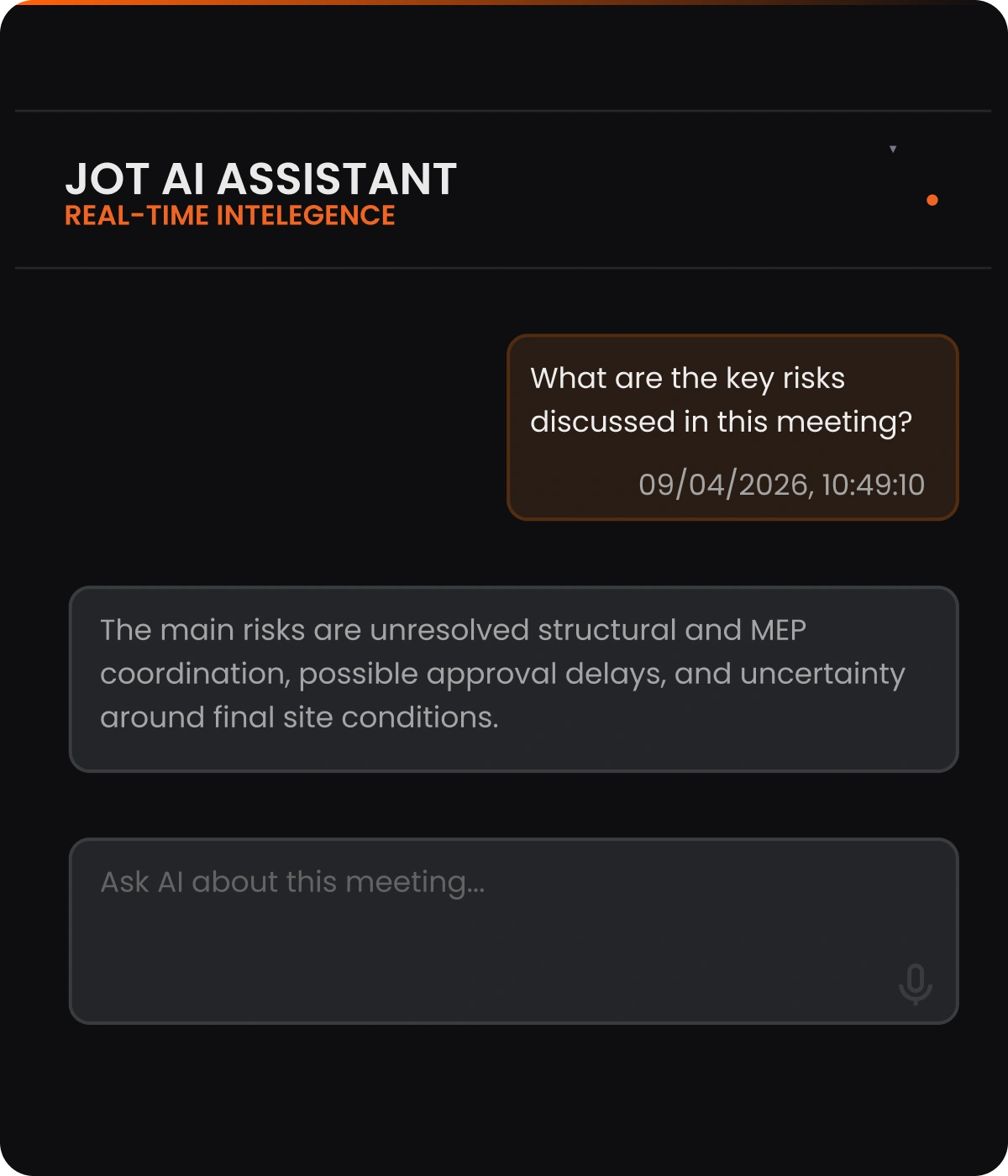
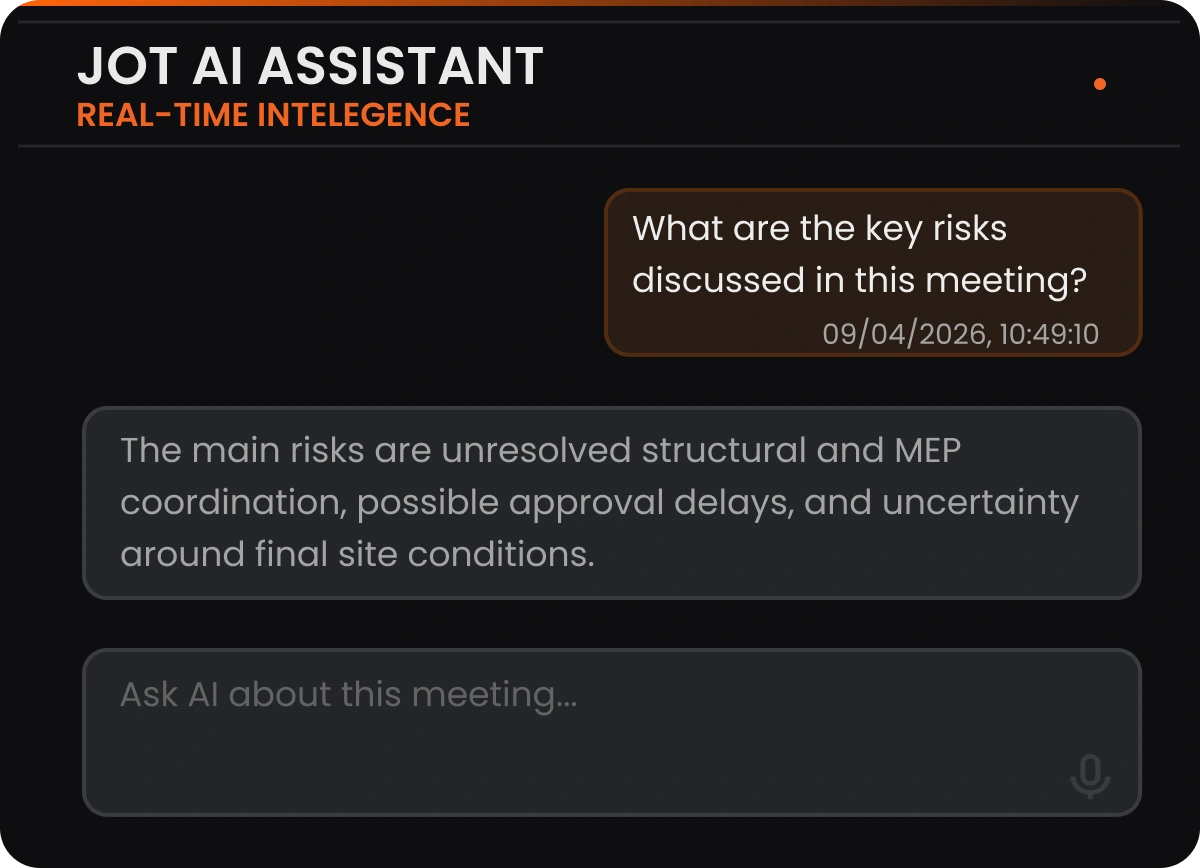
The J.O.T AI Assistant is available in the right panel of every meeting summary. Team members — including those who were not on the call — ask questions in natural language: "what risks were flagged?", "who owns the infrastructure check?", "did we confirm the delivery date?"
The AI searches the full transcript and responds with a grounded answer. Consequently, no rereading and no chasing recaps.
What changes when J.O.T AI runs
your meeting-to-execution workflow
Every decision lands somewhere
Action items from every meeting are captured, structured, and presented for team review — not reconstructed from memory two days later.
Risks surface before they cost you
J.O.T AI runs Risk Mitigation analysis on every meeting recording — so blockers and gaps appear in the summary, not in the sprint retrospective.
No more "what did we decide in that call?"
Every meeting summary, risk analysis, and action item is available to everyone in the project — no recap emails, no repeated questions, no lost context.
One system instead of four tools
Meeting recording, AI analysis, action item review, and project management all live in J.O.T APP. No exports, no copy-paste, no separate subscriptions.
How AI in project management is
changing how technical teams operate
AI in project management is moving from novelty to infrastructure. Teams that previously spent hours on meeting notes, task re-entry, and status chasing now automate that entire layer — freeing project managers to focus on decisions that require human judgment.
Meeting intelligence
AI captures and structures what was said, decided, and flagged — so nothing depends on someone's memory or attention span.
Action item identification
AI identifies what needs to happen, assigns priority levels, and presents it to the team for confirmation — before the next coordination call.
Execution reporting
Meeting output flows into the project immediately — structured, searchable, and visible to everyone
who needs it.
J.O.T APP connects all three into a single workflow. Therefore, teams do not manage handoffs between tools — the meeting feeds the analysis, the analysis feeds the action items, and the action items feed the team.
AI project management tools built for technical teams
Technical projects move through phases, reviews, and handoffs — and each one generates decisions that need to land somewhere real. J.O.T AI captures them at the source, structures them with priorities, and presents them to the team for review and action.
For engineering leads and AEC project managers, this means fewer missed action items. Additionally, the project board reflects what the meeting actually produced — not what the team reconstructed afterwards.
Managing multiple projects means managing multiple sources of information simultaneously. J.O.T AI consolidates that — giving PMO teams a consistent view of meeting intelligence, open risks, and action item clarity across every active project.
Furthermore, AI-generated daily reports replace the manual aggregation that previously took hours every Friday afternoon.
If your team currently uses one tool for meetings, another for tasks, another for reporting, and a shared drive for everything else — J.O.T APP replaces the entire stack. The recording feeds the analysis. The analysis surfaces the action items. The team knows exactly what to work on next.
Consequently, the team spends less time managing tools and more time delivering work.
AI project management software that goes
beyond the summary
Most AI tools for project management generate output — summaries, suggestions, status drafts. However, they hand it back to you, and someone still has to move it into the system where work actually happens. J.O.T APP works differently because the AI operates inside the workflow, not layered on top of it.
The recording goes into the project. The analysis comes out of the project. The team reviews action items inside the project and confirms what to act on next. For teams managing complex, multi-phase projects — AI that stops at "here is a summary" is not enough.
Capability
Generic PM + AI add-on
J.O.T APP (integrated)
Meeting recording
Separate tool or add-on subscription
Built-in browser plugin — included
Action items
Extracted in AI tool → manual transfer to PM
AI-prioritized, owner-assigned, team-reviewed, ready to act
Reporting
Manual status updates or separate BI tool
Compiled from real execution data
Get Started
Start recording meetings in
three simple steps
Create your J.O.T APP account, download the browser plugin, and follow the video guide to install it. Once the plugin is ready, you can record Zoom, Google Meet, and Microsoft Teams meetings directly from your browser.
Create your account
Sign up in J.O.T APP to prepare your workspace for meeting recordings, transcripts, and AI-generated outputs.
Download the plugin
Get the J.O.T AI browser plugin and save it to your device before starting the installation.
Install and connect
Follow the video tutorial below to install the plugin and connect it to your J.O.T APP account.
Grow your business
AI Feature System
J.O.T AI Note Taker
Browser plugin that records your Zoom, Meet, or Teams meeting and uploads it to J.O.T APP. The starting point for all AI analysis.
AI Meeting Summary
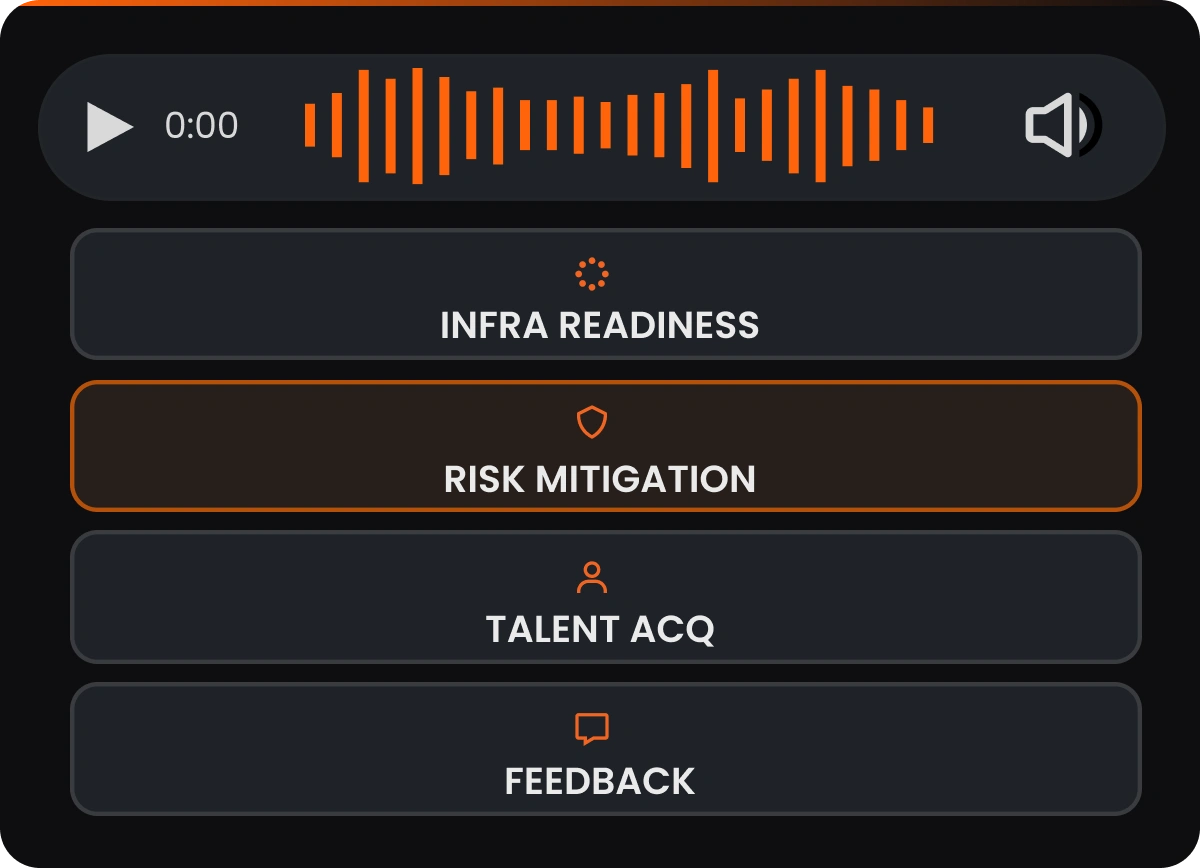
Executive Summary with Key Focus, Context & Sentiment, Risk Mitigation, Infrastructure Readiness, and full transcript — generated after every recording.
AI Meeting Assistant
The complete AI meeting experience — from recording to analysis to Q&A. Ask J.O.T AI anything about the meeting in natural language.
AI Project Assistant
J.O.T AI identifies action items with priorities and assigns owners. Your team reviews and decides what moves next — human judgment stays in the loop.
Turn Your Next Meeting Into a Working Project Plan
See how J.O.T AI captures meeting context, turns decisions into tasks, and keeps your team aligned inside one project workflow.
Help Center
Frequently asked questions
Quick answers to questions you may have. Can't find what you're looking for? Check out our full documentation.
AI project management tools use artificial intelligence to handle the operational layer of running a project. They capture meeting decisions, identify and prioritize action items, track sprint progress, surface risks, and generate execution reports. In J.O.T APP, AI captures and structures the output of every meeting. The team then reviews the action items and confirms what enters the sprint — so human judgment stays in the loop at the moment it matters.
J.O.T AI starts with the meeting recording — captured via browser plugin from Zoom, Google Meet, or Teams. It transcribes the session, generates a structured Executive Summary with risk and sentiment analysis, and identifies action items with priority levels. The team reviews those items and confirms which ones move into the active sprint. From there, tasks follow the same WBS → sprint → Kanban → daily report workflow as everything else in J.O.T APP. There is no separate AI interface — it is embedded in the project.
J.O.T APP includes a browser plugin that records meetings — so yes, it captures notes. However, the note is not the product. What J.O.T AI does with the recording is the product: a full transcript with speaker attribution, a structured Executive Summary, risk and infrastructure analysis, and a prioritized list of action items for the team to review. Most AI note-taking tools give you the document. J.O.T APP gives you the document and the sprint tasks that follow from it.
Regular AI meeting tools are useful for capturing, transcribing, and summarizing conversations. J.O.T AI is built for the next step: connecting meeting output to real project execution.
The result is not just a transcript or summary. It becomes part of the project workspace, where teams manage WBS, sprints, Kanban tasks, daily reports, and analytics.
No — and J.O.T APP is not designed to replace one. AI in project management handles the capture and structure layer: it records meetings, generates analysis, identifies action items, and tracks execution. The project manager's role — judgment on priorities, stakeholder relationships, risk decisions, sprint planning — remains entirely human. However, what changes is how much administrative overhead the project manager carries. With J.O.T AI, that overhead drops significantly.
Yes. J.O.T AI works asynchronously — it processes meeting recordings and makes all output available in the project workspace regardless of time zone. Team members who were not on the call receive the same structured summary, transcript, and action item list as those who attended. As a result, the project board reflects the real state of work at all times — without anyone needing to send a recap email.
Drop us a line.
We'll hear from you soon.
Need a quick question answered? Our support team is available to answer any queries seven days a week.
Contact information:
Email: appjot@jot-s.com