DAILY REPORTS
Project reporting software built from daily execution data
Most project reporting software asks someone to fill in a status update. J.O.T APP builds the report from what the team actually did — tasks completed, hours logged, files attached, decisions recorded. A continuous, searchable record of real execution. No summary required. No interpretation layer in between. Built for engineering, architecture, and technical operations teams.

What's Inside
What Each Daily Report Includes
A daily report in J.O.T APP is not a free-text field. It is a structured log connected to the task and sprint where the work happened. For each working day, the report captures:
Time spent per task
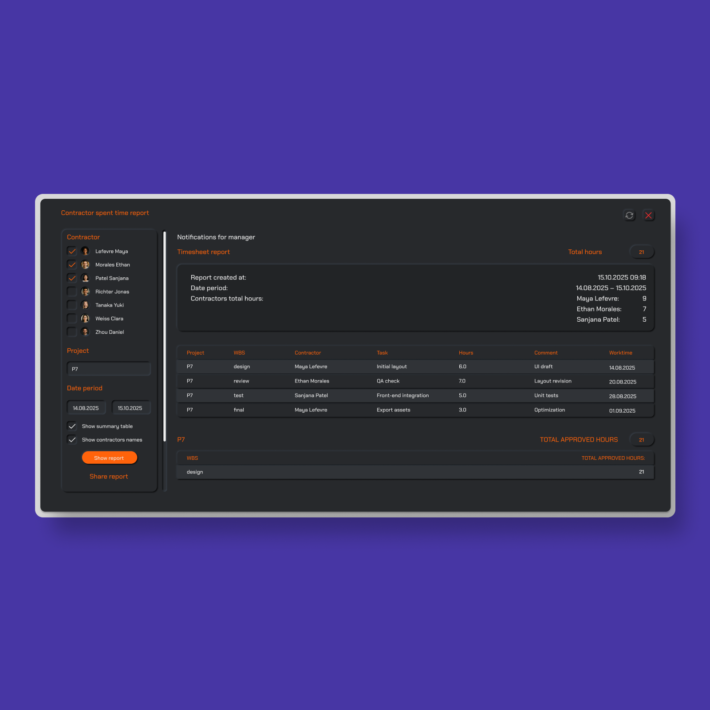
Hours are logged at task level — visible in the daily report and aggregated into timesheets and sprint summaries.
Sprint and WBS context
Every log entry is tagged to its sprint and WBS node, so progress is always traceable to a project phase and deliverable.
The result is a daily project status report that a manager can read in two minutes — and trace back to the exact task, the exact team member, and the exact moment work happened.
CLEAR DAILY LOG
Understand not just what was done, but why
Status reports get read once and forgotten. A project record becomes the source of truth for reviews, handovers, and audits. J.O.T APP daily reports are the second kind — tasks, decisions, and context in one place.
When a task moves to Check and a file is attached, the reviewer sees everything: what was done, who did it, how long it took, what changed. The reasoning behind the work — not just the outcome.
FILES & LINKS
Keep proof close to the work
Attach drawings, screenshots, documents, photos, and external links directly to daily updates. Everything stays connected to the task and the sprint where it belongs — not scattered across email threads, shared drives, or chat messages
Good reporting doesn’t slow teams down. It saves time later — when questions inevitably appear.
Project Reporting Tools
Project reporting tools
built for execution, not analysis
Most reporting tools software is designed for analysis — dashboards, charts, data exports, business intelligence. They answer questions about trends and patterns. They are powerful. And they require someone to feed them data.
J.O.T APP is a different type of reporting tools software. It is built for project execution teams who need a continuous record of what happened on the project today — not a quarterly business review. Reporting is not a separate module. It is built into the task workflow: when a team member logs time, completes a task, or attaches a file, that action becomes part of the daily project report.
For engineering and AEC project managers, J.O.T APP project management reporting tools capture data at the source — in real time, on site, in sprint reviews. The result is project status reporting that is always current, always traceable, and requires zero manual aggregation.
SHARED VISIBILITY
Everyone works from the same project status report
In J.O.T APP, daily reports are shared across the team in real time. Managers, supervisors, and contractors work from the same daily record — no private notes, no parallel documents, no missed updates between teams.
When a manager opens the daily report at 9am, they see exactly what the team logged yesterday — without requesting it, summarising it, or interpreting it. For distributed teams across disciplines or locations, this eliminates the coordination overhead that usually goes into keeping everyone aligned.
TRACEABLE PROGRESS
Build a searchable timeline of real project work
Daily Reports in J.O.T APP create a continuous, searchable history of execution. Every day adds a layer to the project record — tasks completed, time spent, decisions made, files attached.
This traceable record reduces follow-ups, prevents misunderstandings, and supports project reviews, client handovers, and formal audits. When a stakeholder asks what happened between week four and week six, the answer is in the daily reports — searchable by date, by team member, by WBS category, or by sprint.
Help Center
Questions? Answers.
Quick answers to questions you may have. Can't find what you're looking for? Check out our full documentation.
Project reporting software gives teams and managers a structured view of project progress — tasks completed, time spent, status by sprint or phase, and delivery against plan. In J.O.T APP, project reporting is built into the daily workflow: team members log their work as they do it, and reports are generated from that data. There is no separate reporting module to populate or configure.
Most reporting tools software is designed for business intelligence and data analysis — dashboards built from aggregated data. J.O.T APP is project execution reporting: it captures what happened at the task level, in real time, as the team works. The report is not assembled from a data source — it is the live record of what the team did today, connected to tasks, sprints, and WBS categories. No manual aggregation, no interpretation layer, no delay.
Each daily report includes: tasks completed or updated during the day, time logged per task, any files or links attached to daily updates, and the WBS and sprint context for each entry. The report shows who did what, how long it took, and where in the project it belongs. Managers can read the full team's daily report in one view, or filter by team member, sprint, or WBS node.
For many teams, yes. Daily standups exist to communicate what was done yesterday and what is planned today. J.O.T APP daily reports make that information available asynchronously — logged by each team member at the end of their working day, visible to the whole team and to management first thing the next morning. For distributed teams or teams with varied schedules, this eliminates the coordination overhead of a daily synchronous meeting without losing visibility.
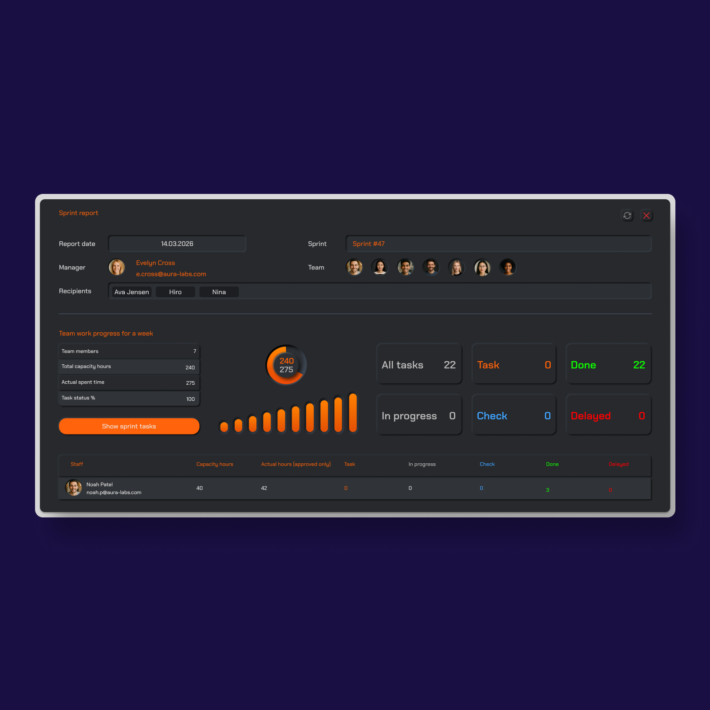
Daily reports in J.O.T APP are the source data for sprint-level reporting. When a sprint closes, the sprint report aggregates all daily entries from that period — tasks completed, total time logged, progress against sprint scope, and files attached. Sprint reports are always accurate and complete because they are compiled from real daily execution data, not from summary inputs filled in at the end of the sprint.
Both. Team members use J.O.T APP to log their daily work — tasks, time, files, and notes — within the flow of their regular project work. Managers use the daily report view to see consolidated project status across all team members, filter by sprint or WBS category, and track delivery without requesting updates. The same data serves both audiences from the same system.
Drop us a line.
We'll hear from you soon.
Need a quick question answered? Our support team is available to answer any queries seven days a week.
Contact information:
Email: appjot@jot-s.com