

Task Management
Task management software connected to projects, reports, and real execution
J.O.T APP is task management software built for teams that manage structured, deliverable-based work. Every task has an owner, a status, a sprint, a WBS category, and a time log — connected from the moment it is created.
Why Task Management Fails
Task management breaks down
when tasks live outside the project
Most teams have task management. The problem is that their tasks are disconnected — from the project structure, from reporting, from time tracking, and from each other. Tasks pile up, context gets lost, and the manager still has to chase status updates manually.
Tasks without structure
A flat task list treats a critical engineering deliverable the same as a minor internal request. There is no WBS category, no sprint assignment, no dependency — just a title and a due date. Context disappears before the work begins.
Assignments without accountability
When a task is assigned, the assignee often has no brief, no files, no discussion thread, and no history. Questions get asked in chat. Answers get lost. The same conversation happens twice.
Progress without visibility
Managers find out tasks are blocked, delayed, or incomplete at the worst possible moment — in a status meeting, or when the deliverable does not arrive. The task system did not show the problem early enough because it was not connected to reporting.
How J.O.T APP Works
One task management system —
from assignment to delivery
In J.O.T APP, a task is not just a card on a board. It is a unit of project execution — connected to the sprint it belongs to, the WBS node it falls under, the person responsible for it, and the reports that track its progress. Tasks do not exist in isolation. They are part of a structure that makes every piece of work traceable from the moment it starts to the moment it is done.
01
Every task starts with full context
Tasks are created with an owner, priority, deadline, WBS category, sprint assignment, description, and attachments. The person doing the work has everything they need before they begin — no back-and-forth, no missing brief.
02
Work moves through defined stages
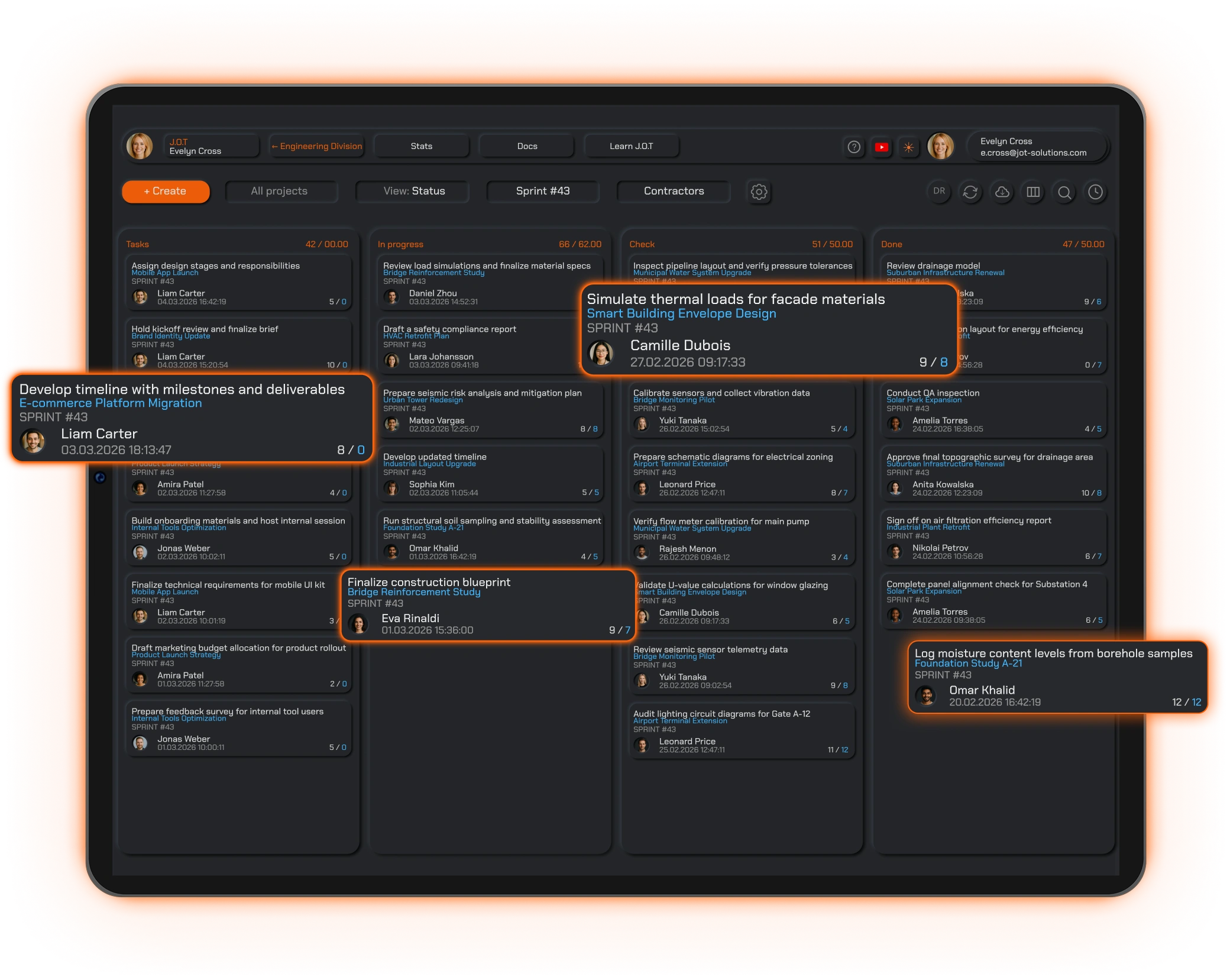
Tasks progress through clear stages — Tasks, In Progress, Check, Done — visible on the task board in real time. Everyone on the team sees what is waiting, what is active, what needs review, and what has been completed.
03
Discussion and files stay on the task
Questions, decisions, attachments, and comments live on the task where the work is happening —
not in email or chat. When a reviewer opens the task,
the full history
is there.
04
Completed tasks feed into daily reports
When a task moves to Done, it becomes part of the daily report for that day. Time logged, files attached, status changes made — all of it connects to the project record without any manual aggregation.
What’s Inside
Everything a task tracking software needs —
connected to project delivery
J.O.T APP combines task management, sprint planning, time tracking, daily reports, and Kanban workflows into one connected task management system for structured teams.
Task details with full context
Every task carries a description, owner, priority, deadline, WBS category, sprint, attachments, comments, and time log. The task is the single source of truth for every piece of work.
Task templates
Create reusable task templates for recurring work types. Standard tasks — reviews, approvals, coordination meetings, deliverable submissions — can be created consistently across projects without rebuilding from scratch each time.
Task board
Track all tasks visually across stages on the Kanban task board — filterable by sprint, WBS category, owner, or discipline. Team members see their own tasks. Managers see the full project in one view.
Time tracking at task level
Log time directly on tasks. Hours connect automatically to the sprint, WBS category, and project record — no separate timesheet tool required.
Daily reports from task activity
Team members create daily reports based on the tasks they completed. Because every task already carries its context, reporting takes minutes instead of half an hour of memory reconstruction.
Task notifications
Get notified when a task is assigned, a status changes, a comment is added, or a deadline is approaching. Tasks move forward without manual follow-up.
Task Management System
A task management system built for project work —
not personal to-do lists
Most task management systems start as personal productivity tools — built for individuals managing their own work. They are fast, simple, and flexible. They are also flat: every task looks the same, regardless of its complexity, its place in the project, or the team that needs to execute it.
J.O.T APP is a task management system built from the project up. Tasks are not independent items — they belong to a WBS structure, a sprint, and a project. A task assigned to a structural engineer sits under the Structural WBS node, belongs to the current sprint, and contributes to the sprint report when it is completed. A task assigned to the BIM team sits in a different node, a different view, and a different discipline filter — but both are visible to the project manager in the same task board overview.
For team task management software, this structure matters. When tasks are connected to the project — not just to a list — managers can see delivery status without asking for it. The task management system shows not just what is assigned, but where it belongs and what it means for the project.
This is the difference between a task board that tracks work and a task management system that tracks delivery.
Who Uses It
Task management software for teams running structured, repeatable work
J.O.T APP is built for teams where every task belongs to a project, a phase, and a deliverable — not just a personal to-do list.
Multidisciplinary project teams manage deliverables across Structural, Architecture, BIM, HVAC, and Civil workstreams. Each discipline filters the task board to their own assignments. The project manager sees all disciplines in one view, with sprint progress and WBS context visible on every task.
Best for: Technical deliverables, design coordination, BIM task management, multi-discipline project execution.
Operations teams run structured weekly sprints with task ownership, priorities, and clear delivery targets. Every task has a defined stage, a responsible owner, and a place in the sprint — so nothing falls through the gap between assignment and delivery.
Best for: Recurring operations work, internal delivery cycles, technical support management.
PMO teams use J.O.T APP to standardize task structure across multiple projects. Consistent task templates, shared statuses, and sprint-level visibility give the PMO a reliable view of delivery without micromanaging each team’s individual workflow.
Best for: Portfolio-level task visibility, governance, cross-project reporting.
Development and IT teams manage bugs, features, UX work, backend tasks, and support requests in parallel sprints. The task board filters by WBS category and sprint — developers see their tasks, designers see theirs, the tech lead sees everything.
Best for: Product development, IT task management, bug tracking, sprint-based delivery.
Project and Task Management
Project and task management software —
in one connected system
Most teams end up using separate tools for project management and task management. The project plan lives in one place. The task list lives somewhere else. Someone — usually the project manager — has to keep the two in sync manually.
J.O.T APP is project and task management software where the task and the project are the same system. A task created in J.O.T APP already belongs to the project structure: it has a WBS category, a sprint, an owner, and a reporting context. There is no separate sync step. There is no reconciliation at the end of the sprint. The task is the project execution layer.
For IT task management software, this means tickets, implementation tasks, and support requests are connected to sprint planning and delivery reporting — not floating in a separate issue tracker. For employee task management software, it means every team member’s assigned work is visible in the project context — not just on their personal task list.
For teams managing structured work across disciplines, deadlines, and deliverables, task management software for teams needs to do more than show who owns what. It needs to show how each task connects to delivery — and J.O.T APP is built to do exactly that.
Why J.O.T APP
The best task management software for project teams connects tasks to delivery — not just to a list
Simple task management tools are built for simple work. For teams managing complex, structured projects, the question is not just "Is this task done?" The question is: "What does this task completing mean for the project?"
A task needs to carry more than a status and a due date
On a structured project, a task without context creates work downstream. Someone has to find the brief, locate the files, reconstruct the decision, and figure out where this task sits in the delivery plan. A task that carries its WBS category, sprint, time log, discussion thread, and reporting context removes that overhead before it starts.
J.O.T APP connects every task to the project
In J.O.T APP, a task is simultaneously a sprint item, a WBS deliverable, a timesheet entry, and a daily report data point. When a task moves to Done, the project record reflects it. The project manager does not need to chase status — the task management system shows it.
See How It Works
See how your team's tasks connect to the project
J.O.T APP gives every task a sprint, a WBS category, a time log, and a place in the project record. Book a demo and we will walk through how it works for your team's specific task structure and delivery process.
Help Center
Frequently asked questions
Quick answers to questions you may have. Can't find what you're looking for? Check out our full documentation.
Task management software helps teams create, assign, track, and complete work. It gives every task a clear owner, status, deadline, and path through the project. In J.O.T APP, task management is connected to sprint planning, WBS structure, time tracking, and daily reporting — so tasks reflect real project execution, not just a to-do list.
Most task management tools focus on individual tasks — owner, due date, status. J.O.T APP connects every task to the project structure behind it: sprint, WBS category, time log, files, discussion thread, and daily report. When a task moves through the stages in J.O.T APP, it is not just a status change — it is a project execution event that updates reports automatically.
Yes. J.O.T APP supports multiple active projects simultaneously. Each project has its own task board, sprint structure, WBS categories, and reporting. Managers filter tasks by project, sprint, WBS node, or team member. PMO and portfolio teams can view task progress across all active projects in one place.
Yes. J.O.T APP is built for teams — not individual task lists. Every task has a defined owner, but the full team can see task status, progress, comments, and files in real time. Managers see workload distribution and sprint progress across the full team without requesting manual updates.
Every task in J.O.T APP carries its project context: sprint, WBS category, owner, time log, and status history. When team members create daily reports, that context is already in place — they record what was completed and the system connects it to the project record. Sprint reports aggregate task completion, time logged, and delivery progress automatically.
J.O.T APP is used by engineering firms, AEC practices, IT teams, technical operations teams, and PMOs managing structured project work. It is particularly effective when tasks are connected to deliverables, phases, disciplines, time tracking, and formal reporting — rather than simple personal to-do management.
Drop us a line.
We'll hear from you soon.
Need a quick question answered? Our support team is available to answer any queries seven days a week.
Contact information:
Email: appjot@jot-s.com