

AI note taker for project meetings —
record, upload, and let J.O.T AI do the rest
J.O.T APP's browser plugin captures your meeting audio directly from Zoom, Google Meet, or Microsoft Teams. When the call ends, you upload the recording to your J.O.T APP project with one click — and AI turns it into a full transcript, structured summary, action items, and risk analysis. Your team keeps talking. J.O.T APP keeps track.
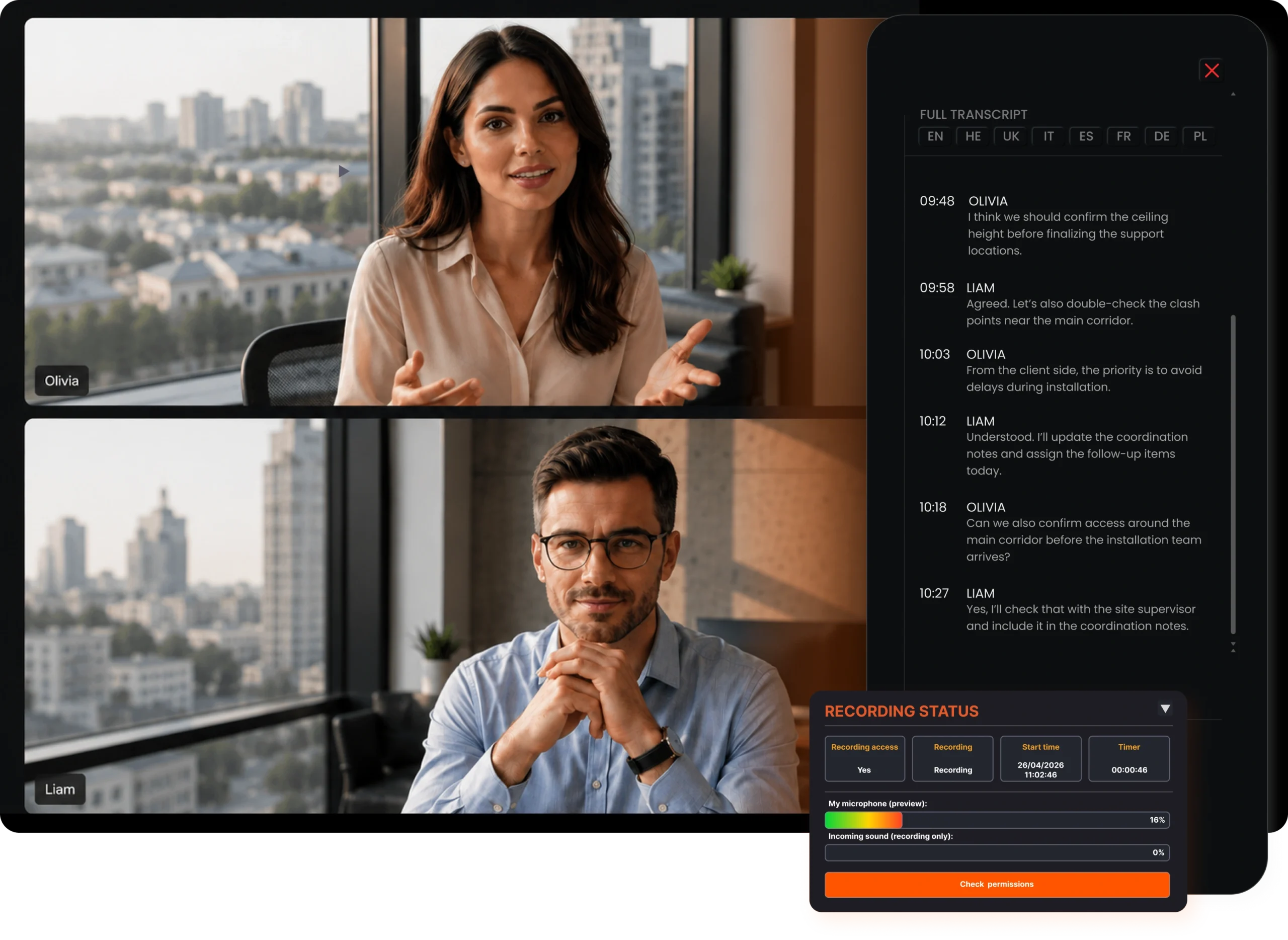
What is the J.O.T APP AI note taker?
The J.O.T APP AI note taker is a browser plugin that records your Zoom, Google Meet, or Microsoft Teams meetings with one click. When the call ends, you upload the audio to your project — and J.O.T AI takes over from there.
Every word, captured
Full transcript with speaker attribution and timestamps — ready the moment the call ends.
Analysis, not just notes
J.O.T AI structures the meeting into Key Focus, Context & Sentiment, risks, and action items — automatically.
Stays in the project
The recording, transcript, and summary live inside your J.O.T APP project — not in a separate tool.
However, most AI note taking apps stop at documentation. J.O.T APP starts there and continues into project execution. The note taker is the first step — everything that follows is what makes it useful for a project team, not just a participant who missed the call.
The best AI note taking app
for project teams connects to the project
Most AI note taking apps serve individuals. They capture what was said and return it as a transcript, a summary, or a shareable document. That approach works for personal reference — however, for a project team, it is not enough.
Generic AI note taking app
- Transcript sits in a separate tool;
- Action items require manual transfer to task board;
- Another subscription, another tab to check;
- Meeting output is a document — not part of the project
J.O.T APP AI note taker
- Recording lives inside the project;
- Action items are AI-identified, prioritized, and assigned;
- One system — no switching, no re-entry;
- Meeting output is part of the project record
How the J.O.T APP AI note taker works
Install the browser plugin — takes under two minutes
The J.O.T Audio Recorder installs as a browser extension. It connects to your J.O.T APP account and lets you select which team and project the recording belongs to. Setup requires no technical configuration.

Record your meeting with one click — no bots, no interruptions
When your Zoom, Google Meet, or Teams call begins, open the plugin and press Start Record. J.O.T APP captures the meeting audio directly from your browser — no bot joins the call and no separate recording software is needed.
Upload to your project — your team has it immediately
When the meeting ends, you choose which J.O.T APP project to upload the recording to — and upload it with one click. Alternatively, you can save the file to your device.
AI note taking that works
where your meetings happen
Zoom
Connect the J.O.T APP plugin to your Zoom calls and record client sessions, project reviews, and coordination calls directly from your browser. No Zoom bot is required — just the plugin running alongside your call.
Google Meet
Use J.O.T APP with Google Meet for design reviews, team check-ins, and client sessions. The recording captures everything said in the session. Additionally, it uploads directly to the project workspace your team is already working in.
Microsoft Teams
J.O.T APP works with Teams meetings in the same way — one-click recording and full AI analysis on upload. For teams running internal projects on Teams, J.O.T APP connects the meeting to the project without any platform switching.
An AI note taker built for
what happens after the meeting
The best AI note taking app is not the one with the cleanest transcript. It is the one where the transcript leads somewhere useful. J.O.T APP's note taker serves as the entry point into a system built for project execution — not a standalone tool that generates documents and stops there.
When your meeting records in J.O.T APP, it does not live in a separate app. It lives in the project where your team works. The transcript is searchable alongside tasks and daily reports. The AI identifies action items with priorities and owners — and your team reviews them within the same project view.
Consequently, the meeting becomes part of the project record — traceable, actionable, and connected to everything that happens next.
Help Center
Frequently asked questions
Quick answers to questions you may have. Can't find what you're looking for? Check out our full documentation.
The J.O.T APP AI note taker is a browser plugin that records your Zoom, Google Meet, or Microsoft Teams meetings and uploads them to your J.O.T APP project. J.O.T AI then transcribes the recording, generates a structured summary and analysis, and identifies action items with priorities and owners for the team to review.
No. The J.O.T APP plugin records audio directly from your browser without joining the call as a separate participant. Your meeting attendees do not see a bot in the participant list. The recording runs quietly via the browser extension while you stay focused on the meeting.
J.O.T APP currently supports Zoom, Google Meet, and Microsoft Teams via the browser plugin. You install the plugin once, and it works across all three platforms from the same extension.
When the meeting ends, you choose which J.O.T APP project to upload the recording to — and upload it with one click. From there, J.O.T AI generates a full transcript with speaker attribution, an executive summary with Key Focus and Context analysis, structured intelligence blocks, and a prioritized list of action items. Additionally, the recording can be replayed and the transcript can be searched at any time from inside the project.
Yes. Because the recording and all AI-generated output live in the J.O.T APP project, team members who were not on the call can access the transcript, summary, and action items immediately. They see exactly what was discussed and what they are responsible for — without asking anyone for a recap.
J.O.T AI transcribes with speaker attribution — it identifies who said what based on the audio. Speakers can be reassigned in the interface if the automatic attribution needs correction. Furthermore, the transcript supports multiple languages, with the ability to switch the display language after the recording is processed.
Drop us a line.
We'll hear from you soon.
Need a quick question answered? Our support team is available to answer any queries seven days a week.
Contact information:
Email: appjot@jot-s.com